Aloha Browser is a web browser application for mobile devices and computers, developed and published by Aloha, a company based in Cyprus. Unlike many conventional browsers, Aloha Browser focuses heavily on user privacy and security. Key features such as a VPN, anti-tracking, private browsing, and data protection are all built directly into the app, allowing users to protect themselves instantly without installing third-party extensions or extra software.

Aloha Browser v8.14.1 MOD APK (Premium Unlocked)
| Name | Aloha Browser |
|---|---|
| Publisher | Aloha Mobile |
| Genre | Productivity |
| Size | 300 MB |
| Version | 8.14.1 |
| MOD Info | Premium Unlocked |
| Get it On |

|
MOD Info
- Premium Unlocked

Advantages of Aloha Browser
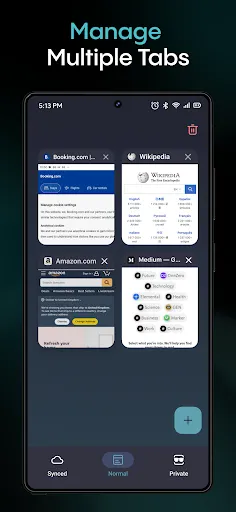
This built-in ecosystem is the biggest differentiator between Aloha Browser and standard browsers like Chrome, Safari, or native stock browsers. By integrating essential privacy tools and multimedia features directly into the core application, it delivers a full-fledged browsing experience out of the box without requiring any external add-ons.
Consequently, Aloha Browser caters perfectly to all types of users. Casual users do not have to waste time searching for and installing the right extensions, while tech-savvy individuals can significantly cut down their browser setup time. Furthermore, relying on built-in features reduces the risk of data leaks caused by accidentally installing unverified or untrustworthy extensions, ensuring a much safer and more convenient browsing experience.
Free Built-In VPN of Aloha Browser
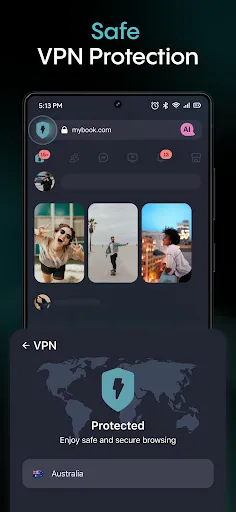
A VPN (Virtual Private Network) is a technology that encrypts your internet connection and routes your traffic through an intermediary server, enhancing privacy and reducing tracking while you browse. This is the standout feature of Aloha Browser.
You can toggle the VPN on or off instantly with a single tap right on the address bar at the top of the screen. When activated, a shield icon labeled “VPN” will light up to indicate it is running; when turned off, the icon goes inactive. This quick-toggle mechanic is highly convenient, letting you switch the VPN on whenever you need an extra layer of privacy or a secure connection, and turn it off just as easily when accessing services or websites that restrict VPN traffic.
Free vs. Premium Plans
The VPN service in Aloha Browser is split into free and premium plans. With the free plan, users can access all core VPN features with completely unlimited bandwidth. Aloha strictly enforces a no-logs policy, promising never to share data with third parties to ensure high privacy during sessions. For the premium plan, users unlock advanced features like faster connection speeds, higher stability, the ability to choose servers across different countries. Selecting the right server location shortens data travel distance, improving loading times, reducing latency while using the VPN. However, for everyday browsing, standard privacy protection, Aloha’s free plan already meets the needs of most users.
Built-In Ad Blocker of Aloha Browser
This is the second most important feature of Aloha Browser, right after the VPN, making it one of the most frequently used tools. The ad blocker is activated by default the very first time you open the app, requiring zero setup from the user. While browsing, the vast majority of banner ads, pop-up windows, and annoying promotional content will be automatically removed. This keeps webpages clean, delivering a seamless reading experience.
Additionally, Aloha Browser integrates a “Hide distracting item” feature. This tool allows you to manually select, hide any element on a webpage you do not want to see, such as remaining ad blocks, notification bars, recommendation boxes, irrelevant content. It serves as a highly effective solution to eliminate stubborn ads that the automatic blocker might miss, ensuring a cleaner, more focused browsing experience.
Built-In Multimedia Downloader of of Aloha Browser
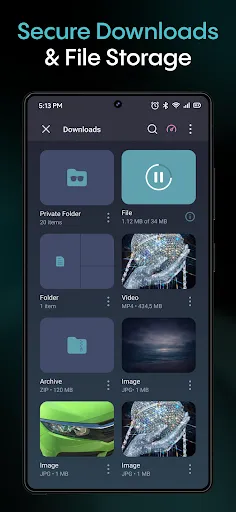
Beyond its robust VPN capabilities, Aloha Browser comes equipped with a highly convenient multimedia downloader. Whenever you stream a video, audio track, or GIF on a webpage, the browser automatically detects the media file and displays a small toolbar at the top of the screen. You can tap the downward arrow icon to download that media file directly to your device’s local storage.
Once downloaded, you can play these files offline right inside Aloha’s built-in media player or open them with any other media app. Note that this feature does not work on every website. For streaming platforms protected by Digital Rights Management (DRM) or sites that strictly prohibit downloading, Aloha Browser will block the download and display a notification stating that the feature is unavailable.
Download Aloha Browser MOD APK for Android
Aloha Browser offers a comprehensive, secure, highly convenient web browsing solution for both mobile devices and computers. Having a VPN, an ad blocker, a multimedia downloader all built in allows you to maximize your privacy without wasting time on complex setups. Aloha Browser is definitely a simple and suitable choice for the vast majority of users.
Download Aloha Browser
Download (300 MB)You are now ready to download Aloha Browser for free. Here are some notes:
- Please read our MOD Info and installation instructions carefully for the game & app to work properly
- Read the FAQ carefully for more details
5/5 (2 votes)





Leave a Comment